Carpenter Icons: Minimalist Design for Every Project
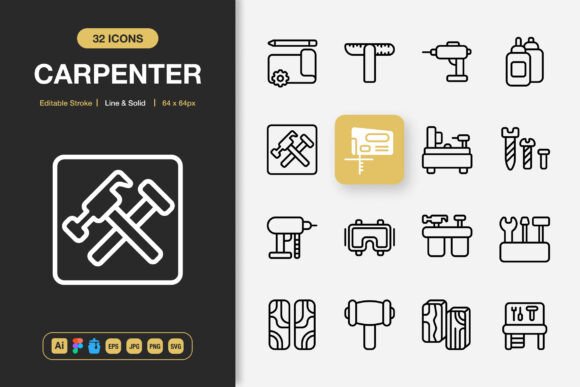
Great visual communication often starts with small, deliberate choices. The icons you pick for a website, an app prototype, or a printed flyer shape how people navigate and understand your work before they read a single word. Carpenter Icons is a collection built around that exact idea, offering high-quality, minimalist icon design that adapts to almost any creative environment. With both line and solid styles, editable strokes, and a thoughtful selection of file formats, the set aims to give you flexibility without adding complexity.
What makes an icon pack worth keeping around for years is how easily it fits into different workflows. Some people need icons they can tweak endlessly in Adobe Illustrator. Others want a ready-to-use SVG they can drop into a web project without extra steps. Carpenter Icons tries to serve both paths by including source files, Figma documents, an Iconjar archive, EPS, JPG, PNG, and SVG formats. That variety reflects an understanding that a single project rarely stays within one piece of software from start to finish.
Understanding the Dual-Style Advantage
One of the first things you notice about this collection is the inclusion of both line and solid style variations. That choice matters more than it might seem at first glance. A line icon feels light, airy, and modern, often working beautifully in clean interface designs or editorial layouts. A solid icon reads faster at small sizes and carries more visual weight, making it better for navigation elements or calls to action. Having both versions of the same icon lets you maintain a consistent visual language while adjusting emphasis depending on context, without hunting down a completely different set.
For a freelancer juggling multiple client brands, this dual format means you can reuse the same core icon set across projects that demand different tones. For a small business owner updating a website and a printed menu simultaneously, the solid style might anchor the checkout buttons while the line style adds subtle decorative touches to the menu headers.
For Creators and Design Professionals
Designers working in agencies or running independent studios often evaluate icon packs against a long checklist. Consistency across the grid, pixel-perfect alignment, naming conventions, and the quality of the vector paths all matter deeply. With Carpenter Icons, the source files are fully editable, so you can match stroke thickness to an existing brand system or recolor everything in seconds. The Iconjar integration also appeals to professionals who manage large icon libraries and need to search and drag assets straight into Sketch or Figma without breaking their flow.
An experienced UX designer might use the Figma file to build an interactive prototype where icons serve as navigation cues. Because the icons are 100% customizable, they can test both line and solid states to see which version improves task completion rates before handing off final assets to developers.
For Small Business Owners and Entrepreneurs
Not everyone has a design background, and not every small business can outsource visual work. If you run a café, a boutique, or a local service, you might be updating your own social media posts, printing flyers, or refreshing your website banner. Carpenter Icons includes easy drag-and-drop PNG files with transparent backgrounds that work in Canva, PowerPoint, and basic editing tools. No Illustrator knowledge required. The high-resolution JPGs serve the same purpose when transparency is not needed, giving you a quick way to make marketing materials look polished.
The real value for a busy owner is time. Instead of browsing free icon sites with inconsistent quality and uncertain licensing, you get a complete, structured collection where every icon shares the same visual DNA. That coherence makes your brand look intentional, even when you are moving fast.
For Educators and Content Makers
Teachers, course creators, and bloggers often need visual aids that clarify ideas without distracting from the message. A well-chosen icon can replace a bullet point, illustrate a concept in a handout, or break up text in a slide deck. The minimalist design of this set keeps the focus on the content. The editable stroke feature also means an educator can adjust the line thickness to make icons readable on a projector from the back of a classroom, something fixed-size icons cannot always guarantee.
For someone building an online course, the SVG files integrate cleanly into platforms like Teachable or WordPress, scaling without blurring on any screen. The PNG files drop neatly into PDF worksheets. Having both formats side by side removes the friction of converting files late at night before a launch.
For Beginners and Hobbyists
Learning design tools takes time, and the first few projects can feel frustrating when assets do not behave the way you expect. Carpenter Icons lowers that barrier by providing immediately usable formats while still offering the source files to grow into. A beginner can start with PNGs, get comfortable with placement and composition, and later explore the Adobe Illustrator file to understand how vector paths and strokes are constructed. That gradual learning curve is valuable because it respects where you are now while leaving room to advance.
Hobbyists working on personal projects such as wedding invitations, community event posters, or a hobby blog benefit from the same high-quality finish as a commercial project. The icon set does not distinguish between professional and personal use in its output, so the result looks crisp and cohesive regardless of the audience size.
Editable Stroke and Total Customization
Stroke editing is the feature that separates a static asset from a truly adaptable one. When you can control the thickness, endpoints, and join styles of an icon's lines, you are no longer locked into a single expression. A client might request a bolder icon set for an older demographic, or a mobile app might need thinner strokes to feel elegant on a small screen. Because Carpenter Icons are 100% customizable, these changes happen directly in Illustrator, Figma, or any compatible vector editor, without loss of fidelity.
Drag-and-Drop Compatibility Across Tools
The promise of easy drag and drop matters when you are assembling a presentation at midnight or populating a wireframe during a sprint review. The Iconjar file centralizes the entire set, letting you search by keyword and drag icons directly into your design canvas. The Figma file brings the same convenience to collaborative cloud workflows, where multiple team members need access to the same asset library. These little workflow accelerators add up to a noticeable reduction in project friction over time.
File Formats for Every Output
Different deliverables demand different formats, and this collection addresses that reality head-on. The source Adobe Illustrator file gives you the deepest editing control. The EPS Version 10 preserves broad compatibility with legacy software and print workflows. SVG files are the standard for modern web and app development, remaining crisp on any screen resolution. PNG transparency supports overlaying icons on photographs, colored backgrounds, or complex textures. The included JPG and Readme.txt round out the package, ensuring you have a quick reference and a raster fallback when needed.
Websites and Mobile Apps
Digital products live and die by clarity. Icons that look perfect at 16 by 16 pixels and remain legible at larger touch targets are a requirement, not a luxury. The line and solid styles in Carpenter Icons let interface designers signal interactivity through visual contrast, using a solid icon to highlight an active state while a line icon indicates an inactive one. The SVG format guarantees that this work renders cleanly on retina displays, low-resolution monitors, and everything in between.
Print Projects and Physical Media
Print demands higher resolution and predictable color output. Banners, posters, and flyers often push icons to sizes far beyond what a screen displays. Because the source files are vector-based, expanding an icon to billboard proportions does not introduce pixelation or softening. The EPS and AI files slot into professional print workflows, while the high-resolution JPG provides a raster alternative for simpler print setups or office printers.
Social Media and Infographics
Scrolling attention spans reward visual shorthand. A strong icon can anchor an infographic data point or make a social post stand out in a crowded feed. The PNG transparent files work perfectly for layering onto photo backgrounds in Instagram stories, Facebook posts, or Pinterest pins. The minimalist design keeps the graphic from feeling cluttered, which is critical when text, branding, and imagery all compete for attention in the same frame.
The Designer's Eye
Professional designers tend to zoom in. They check for clean nodes, uniform spacing, optical centering, and consistent corner radii. Carpenter Icons, built with high-quality vector construction, supports that level of scrutiny. The editable nature also means a perfectionist can adjust any detail rather than settling for an almost-perfect match.
The Business Owner's Perspective
Quality from a business angle is about reliability and return on time. A small business owner evaluates whether an investment in visual assets saves hours over the coming months. If the same icon set populates a website redesign, a seasonal menu, and a promotional poster, the cost per use shrinks dramatically. The broad file compatibility also reduces the risk of needing a format you do not have when a printer or developer asks for something specific.
The Hobbyist's Experience
For someone creating purely for enjoyment, quality shows up in how satisfying the final piece looks and how little technical friction they encounter. An icon that drags easily into a layout and blends with other design elements without extra adjustments lets a hobbyist stay in a creative flow. The inclusion of a Readme file also signals thoughtfulness, providing straightforward guidance without assuming prior expertise.
Matching Carpenter Icons to Your Project Goals
Choosing an icon set is ultimately about alignment. If your project values simplicity, consistency, and the ability to adapt visuals across media without starting from scratch, this collection fits well. If you need an icon pack that grows with your skills, from quick PNG drag-and-drop to deep vector customization in Illustrator or Figma, the layered file structure supports that progression. The key is to think about the variety of outputs you produce over a year, not just the immediate task. Materials often get repurposed in ways you do not predict, and an icon set with flexible licensing and multiple formats makes that repurposing seamless.
Consider downloading the set and spending ten minutes exploring the Figma or Iconjar file. Look at the line and solid versions of a few icons side by side. Test how they resize. Try changing the stroke weight on one icon and see how it feels. That hands-on check tells you more than any description can about whether the rhythm of the collection matches your taste and workflow speed.
What Makes an Icon Set a Long-Term Asset
Many icon packs solve an immediate need but fail over time because they lack source files, offer only one style, or deliver inconsistent quality across the set. A true long-term asset is boring in the best way: it works reliably, updates rarely disrupt your files, and you reach for it without thinking. Carpenter Icons, with its combination of line and solid styles, editable strokes, and wide format support, aims to become that dependable resource. The inclusion of the source Illustrator file means the set can evolve alongside your brand or personal style without becoming obsolete when software trends shift.
The minimalist approach also ages gracefully. Trendy, highly stylized icons can look dated within two years, while clean, well-proportioned designs remain useful far longer. For anyone building a visual toolkit they intend to rely on across multiple projects, platforms, and seasons, that longevity carries genuine value. Whether you are crafting a mobile app prototype, laying out a book interior, or designing a weekend party flyer, the right icons quietly elevate the whole piece without demanding the spotlight for themselves.